<?xml version="1.0" encoding="UTF-8"?>
<feed version="0.3" xmlns="http://purl.org/atom/ns#" xml:lang="en-US">
	<title>Angel's Blog</title>
	<link rel="alternate" type="text/html" href="https://angelcool.net/sphpblog/blog_index.php" />
	<modified>2026-05-14T03:22:08Z</modified>
	<author>
		<name>Angel</name>
	</author>
	<copyright>Copyright 2026, Angel</copyright>
	<generator url="http://www.sourceforge.net/projects/sphpblog" version="0.7.0">SPHPBLOG</generator>
	<entry>
		<title>CIsco: Aironet 1242G Autonomos AP Configuration</title>
		<link rel="alternate" type="text/html" href="https://angelcool.net/sphpblog/blog_index.php?entry=entry160221-190807" />
		<content type="text/html" mode="escaped"><![CDATA[Cisco 1242G Access Point Configuration (AIR-LAP1242G-A-K9), Image: c1240-k9w7-mx.124-21a.JA1 Autonomous AP<br /><pre>/*reset everything*/<br />ap#write erase<br />ap#reload<br />ap&gt;en<br />Password: Cisco //default password<br />ap#<br /><br />/*configure AP&#039;s ip address*/<br />ap#config t<br />ap(config)#interface BVI1 <br />ap(config-if)#ip address 192.168.0.100 255.255.255.0<br />ap(config-if)#no shut<br /><br />/*other stuff*/<br />ap(config)#ip name-server 4.2.2.2 8.8.8.8<br />ap(config)#ip default-gateway 192.168.0.1<br />ap(config)#ip domain name example.com<br /><br />/* configure ssid */<br />ap(config)#dot11 ssid 1242G<br />ap(config-ssid)#authentication open<br />ap(config-ssid)#authentication key-management wpa version 2<br />ap(config-ssid)#wpa-psk ascii 123456789 // psk<br />ap(config-ssid)#guest-mode  //broadcasts ssid<br /><br />/* associate ssid 1242G to the radio*/<br />ap(config)#interface dot11radio 0<br />ap(config-if)#encryption mode ciphers aes-ccm<br />ap(config-if)#ssid 1242G<br /><br />/*ssh config*/<br />ap(config)#crypto key generate rsa  //chose 1024<br />ap(config)#aaa new-model <br />ap(config)#aaa authentication login default local //use local database<br />ap(config)#username admin password admin</pre><br />/*defaults http password*/<br />admin/Cisco]]></content>
		<id>https://angelcool.net/sphpblog/blog_index.php?entry=entry160221-190807</id>
		<issued>2016-02-21T00:00:00Z</issued>
		<modified>2016-02-21T00:00:00Z</modified>
	</entry>
	<entry>
		<title>ASA (8.0): Natting inside hosts using outside interface (NAT overload in router lingo)</title>
		<link rel="alternate" type="text/html" href="https://angelcool.net/sphpblog/blog_index.php?entry=entry140406-161543" />
		<content type="text/html" mode="escaped"><![CDATA[All hosts in 192.168.1.0/24 will be seen with source 172.16.1.192 in the internet. May also be known as PAT.<br /><pre>interface Ethernet0<br /> nameif outside<br /> security-level 0<br /> ip address 172.16.1.192 255.255.255.0<br /><br />interface Ethernet1<br /> nameif inside<br /> security-level 100<br /> ip address 192.168.1.1 255.255.255.0 <br /><br />global (outside) 1 interface<br />nat (inside) 1 192.168.1.0 255.255.255.0<br /><br />//bonus: configure dns client in asa<br />dns domain-lookup outside<br />dns server-group DefaultDNS<br /> name-server 8.8.8.8<br /></pre>]]></content>
		<id>https://angelcool.net/sphpblog/blog_index.php?entry=entry140406-161543</id>
		<issued>2014-04-06T00:00:00Z</issued>
		<modified>2014-04-06T00:00:00Z</modified>
	</entry>
	<entry>
		<title>Minicom: Connecting to Cisco router console port</title>
		<link rel="alternate" type="text/html" href="https://angelcool.net/sphpblog/blog_index.php?entry=entry140406-104203" />
		<content type="text/html" mode="escaped"><![CDATA[1)yum install minicom<br /><br />2)dmesg|grep ttyp //see what serial ports are available<br /><br />2)minicom -s //configuration mode<br /><br />3)select &quot;Serial port setup&quot; option<br /><br />4)select &quot;A&quot; and enter desired serial port<br /><br />5)select &quot;E&quot; and specify &quot;C&quot; and &quot;Q&quot; options (9600 8N1)<br /><br />6)make sure &quot;F&quot; is YES and &quot;G&quot; is NO (hardware flow control only),on previous screen<br /><br />7)save setup as CISCO<br /><br />8)run it: [root@localhost ~]# minicom CISCO<br /><br />======================================================================<br />2/2016<br /><br />For step 2 /dev/ttyS0 worked (that&#039;s a zero), and NO Hardware Flow control made pressing enter work, restarted AP and I notice messages were appearing on screen, but hitting enter will not have any results, changing Hardware Flow Control to NO fixed it.<br /><br />/dev/ttyUSB0 also worked :)]]></content>
		<id>https://angelcool.net/sphpblog/blog_index.php?entry=entry140406-104203</id>
		<issued>2014-04-06T00:00:00Z</issued>
		<modified>2014-04-06T00:00:00Z</modified>
	</entry>
	<entry>
		<title>IPSec Tunnels with VTIs</title>
		<link rel="alternate" type="text/html" href="https://angelcool.net/sphpblog/blog_index.php?entry=entry131015-104602" />
		<content type="text/html" mode="escaped"><![CDATA[VIRTUAL TUNNEL INTERFACES<br /><br />Cisco® IPSec VTIs are a new tool that customers can use to configure IPSec-based VPNs between site-to-site devices. IPSec VTI tunnels provide a designated pathway across a shared WAN and encapsulate traffic with new packet headers, which helps to ensure delivery to specific destinations. The network is private because traffic can enter a tunnel only at an endpoint. In addition, IPSec provides true confidentiality (as does encryption) and can carry encrypted traffic.With IPSec VTIs, users can provide highly secure connectivity for site-to-site VPNs and can be combined with Cisco AVVID (Architecture for Voice, Video and Integrated Data) to deliver converged voice, video, and data over IP networks.<br /><br />BENEFITS:<br /><br />• Simplifies management---Customers can use the Cisco IOS® Software virtual tunnel constructs to configure an IPSec virtual tunnel interface, thus simplifying VPN configuration complexity, which translates into reduced costs because the need for local IT support is minimized. In addition, existing management applications that can monitor interfaces can be used for monitoring purposes.<br /><br />• Supports multicast encryption---Customers can use the Cisco IOS Software IPSec VTIs to transfer the multicast traffic, control traffic, or data traffic---for example, many voice and video applications---from one site to another securely.<br /><br />• Provides a routable interface---Cisco IOS Software IPSec VTIs can support all types of IP routing protocols. Customers can use these VTI capabilities to connect larger office environments---for example, a branch office, complete with a private branch exchange (PBX) extension.<br /><br />• Improves scaling---IPSec VTIs need fewer established security associations to cover different types of traffic, both unicast and multicast, thus enabling improved scaling.<br /><br />• Offers flexibility in defining features---An IPSec VTI is an encapsulation within its own interface. This offers flexibility of defining features to run on either the physical or the IPSec interface.<br /><br />Source (as of 2013):<br /><a href="http://www.cisco.com/en/US/technologies/tk583/tk372/technologies_white_paper0900aecd8029d629_ps6635_Products_White_Paper.html" >http://www.cisco.com/en/US/technologies ... Paper.html</a><br />]]></content>
		<id>https://angelcool.net/sphpblog/blog_index.php?entry=entry131015-104602</id>
		<issued>2013-10-15T00:00:00Z</issued>
		<modified>2013-10-15T00:00:00Z</modified>
	</entry>
	<entry>
		<title>Setting NTP in Cisco 1721 router.</title>
		<link rel="alternate" type="text/html" href="https://angelcool.net/sphpblog/blog_index.php?entry=entry131012-131618" />
		<content type="text/html" mode="escaped"><![CDATA[<pre>router#show ver<br />Cisco IOS Software, C1700 Software (C1700-ADVENTERPRISEK9-M), Version 12.4(7), RELEASE SOFTWARE (fc6)...<br /><br />router(config)# ntp server 1.gr.pool.ntp.org<br />router(config)#clock timezone PST -7 //Los Angeles :)<br /><br />router#show clock   <br />18:21:43.570 PST Sat Oct 12 2013<br /><br />router# show ntp associations<br />router# show ntp status<br /></pre><br />]]></content>
		<id>https://angelcool.net/sphpblog/blog_index.php?entry=entry131012-131618</id>
		<issued>2013-10-12T00:00:00Z</issued>
		<modified>2013-10-12T00:00:00Z</modified>
	</entry>
	<entry>
		<title>Cisco Catalyst 3550 Port Mirroring</title>
		<link rel="alternate" type="text/html" href="https://angelcool.net/sphpblog/blog_index.php?entry=entry130408-193056" />
		<content type="text/html" mode="escaped"><![CDATA[Switch(config)# no monitor session 1 <br />Switch(config)# monitor session 1 source interface fastethernet0/1 <br />Switch(config)# monitor session 1 destination interface fastethernet0/8]]></content>
		<id>https://angelcool.net/sphpblog/blog_index.php?entry=entry130408-193056</id>
		<issued>2013-04-09T00:00:00Z</issued>
		<modified>2013-04-09T00:00:00Z</modified>
	</entry>
	<entry>
		<title>Cisco 1721 IOS Image Upgrade from ROMMON using TFTP</title>
		<link rel="alternate" type="text/html" href="https://angelcool.net/sphpblog/blog_index.php?entry=entry130408-120629" />
		<content type="text/html" mode="escaped"><![CDATA[//using tftpd32 server<br /><br />rommon 36 &gt; TFTP_SERVER=172.16.1.8<br />rommon 37 &gt; tftpdnld<br /><br />          IP_ADDRESS: 172.16.1.33<br />      IP_SUBNET_MASK: 255.255.255.0<br />     DEFAULT_GATEWAY: 172.16.1.1<br />         TFTP_SERVER: 172.16.1.8<br />           TFTP_FILE: c1700-adventerprisek9-mz.124-7.bin<br /><br />//If you want to boot from the image on the TFTP server without writing it to flash then use the command: tftpdnld -r]]></content>
		<id>https://angelcool.net/sphpblog/blog_index.php?entry=entry130408-120629</id>
		<issued>2013-04-08T00:00:00Z</issued>
		<modified>2013-04-08T00:00:00Z</modified>
	</entry>
	<entry>
		<title>Site-to-Site VPN Configuration (Rapido y Furioso :)</title>
		<link rel="alternate" type="text/html" href="https://angelcool.net/sphpblog/blog_index.php?entry=entry130404-224439" />
		<content type="text/html" mode="escaped"><![CDATA[//local network<br />//LAN IP addres 10.0.0.0 255.255.255.0<br />//R2(local router) public address: 23.0.1.0 255.255.255.0<br /><br /><br />	crypto isakmp policy 1<br />	authentication pre-share<br />	exit<br /><br />	crypto isakmp key cisco address 56.2.11.2<br /><br />	//interesting traffic<br />	access-list 100 permit 10.0.0.0 0.255.255.255 192.168.1.0 0.0.0.255<br /><br />	//transform set<br />	crypto ipsec transform-set MYSET esp-sha-hmac esp-aes<br /><br />	//crypto map(bind all together)<br />	crypto map MYMAP 1 ipsec-isakmp<br />	set transform-set MYSET<br />	set peer 56.2.11.2<br />	match address 100<br />	exit<br /><br />	//turn on policy (interface with public address)<br />	int fa0/0<br />	crypto map MYMAP<br />	exit<br />	<br />	<br />===============================================================================<br /><br /><br />//remote network<br />//LAN IP address 192.168.1.0 255.255.255.0<br />//R4(local router) public address: 56.2.11.2<br /><br /><br />	crypto isakmp policy 1<br />	authentication pre-share<br />	exit<br /><br />	crypto isakmp key cisco address 23.0.1.2<br /><br />	//interesting traffic<br />	access-list 100 permit 192.168.1.0 0.0.0.255 10.0.0.0 0.255.255.255<br /><br />	//transform set<br />	crypto ipsec transform-set OTHER_MYSET esp-sha-hmac esp-aes<br /><br />	//crypto map(bind all together)<br />	crypto map MYMAP 1 ipsec-isakmp<br />	set transform-set OTHER_MYSET<br />	set peer 23.0.1.2<br />	match address 100<br />	exit<br /><br />	//turn on policy (interface with public address)<br />	int fa0/0<br />	crypto map OTHER_MYMAP<br />	exit<br /><br /><br />//Now local hosts should be able to ping remote hosts<br /><br />//verification commands<br />	show crypto ipsec sa<br /><br />/* IKE phase 1 tunnel is for private use when the two edge routers(R2 &amp;R4) need to talk to each other,and it&#039;s used to create the IKE phase 2 tunnel (also called the IPSec tunnel).*/<br /><br /><br />: )]]></content>
		<id>https://angelcool.net/sphpblog/blog_index.php?entry=entry130404-224439</id>
		<issued>2013-04-05T00:00:00Z</issued>
		<modified>2013-04-05T00:00:00Z</modified>
	</entry>
	<entry>
		<title>Dynamic ACLs (Lock-and-Key ACLs)</title>
		<link rel="alternate" type="text/html" href="https://angelcool.net/sphpblog/blog_index.php?entry=entry130402-135908" />
		<content type="text/html" mode="escaped"><![CDATA[Lock-and-key access allows you to set up dynamic access lists that grant access per user to a specific source/destination host through a user authentication process(telnet login authentication).<br /><br />See cut-through proxy, They call it like that in the ASA world.<br /><br />]]></content>
		<id>https://angelcool.net/sphpblog/blog_index.php?entry=entry130402-135908</id>
		<issued>2013-04-02T00:00:00Z</issued>
		<modified>2013-04-02T00:00:00Z</modified>
	</entry>
	<entry>
		<title>Cisco Router Remote Access IPSec VPN with Pre-Shared Key &amp; Certificate (EZVPN)</title>
		<link rel="alternate" type="text/html" href="https://angelcool.net/sphpblog/blog_index.php?entry=entry130331-095604" />
		<content type="text/html" mode="escaped"><![CDATA[<iframe width="560" height="315" src="http://www.youtube.com/embed/65rTOrmXUFU?wmode=transparent" frameborder="0" allowfullscreen></iframe><br /><br />The video demonstrates configuration of remote access IPSec VPN with Windows software client on Cisco router. We will look at both simple pre-shared key authentication as well as using client certificate. The client is placed behind a NAT router to demonstrate the significance of NAT Transparency, and compare it to raw IPSec and cTCP (IPSec over TCP). The video finishes off by showing how client can be allowed access to local subnet when a non-split tunnel is used.<br /><br />Topic includes<br />- Easy VPN (EZVPN) with Software IPSec Client<br />- Client Pre-Shared Key and Certificate Authentication<br />- NAT Transparency (UDP 4500)<br />- cTCP aka IPSec over TCP<br />- &#039;include-local-lan&#039; Option when not using Split Tunnel]]></content>
		<id>https://angelcool.net/sphpblog/blog_index.php?entry=entry130331-095604</id>
		<issued>2013-03-31T00:00:00Z</issued>
		<modified>2013-03-31T00:00:00Z</modified>
	</entry>
	<entry>
		<title>Cisco Remote Access VPN Client for IPsec (Win7 64b)</title>
		<link rel="alternate" type="text/html" href="https://angelcool.net/sphpblog/blog_index.php?entry=entry130330-094948" />
		<content type="text/html" mode="escaped"><![CDATA[vpnclient-winx64-msi-5.0.07.0290-k9.exe<br /><br /><a href="https://supportforums.cisco.com/thread/2074141" >https://supportforums.cisco.com/thread/2074141</a> (or built in software in Win7?)<br /><br />&quot;We sort of have two main categories of VPN.  1) Lan to Lan (aka Site to Site) and 2) Remote access.  With lan to lan VPN&#039;s, there is some device (router, firewall, concentrator) that terminates bot ends of the connection.  With Remote access, there is a piece of software installed on a PC/Laptop on one end and the other end would be terminated into a router, firewall or concentrator&quot;<br /><br /><a href="https://supportforums.cisco.com/thread/2074141" >https://supportforums.cisco.com/thread/2074141</a>]]></content>
		<id>https://angelcool.net/sphpblog/blog_index.php?entry=entry130330-094948</id>
		<issued>2013-03-30T00:00:00Z</issued>
		<modified>2013-03-30T00:00:00Z</modified>
	</entry>
	<entry>
		<title>CCNP ROUTE  Passed!</title>
		<link rel="alternate" type="text/html" href="https://angelcool.net/sphpblog/blog_index.php?entry=entry130222-233630" />
		<content type="text/html" mode="escaped"><![CDATA[:) Today I passed CCNP 642-902 ROUTE exam !!!<br /><br />•EIGRP<br />•OSPF<br />•IGP Redistribution(Route Maps,Prefix Lists,Distribute Lists)<br />•Policy-based routing and IP service-level agreement (IP SLA)<br />•BGP<br />•IPv6<br />•IPv4 and IPv6 coexistence<br />•Routing over branch Internet connections<br />]]></content>
		<id>https://angelcool.net/sphpblog/blog_index.php?entry=entry130222-233630</id>
		<issued>2013-02-23T00:00:00Z</issued>
		<modified>2013-02-23T00:00:00Z</modified>
	</entry>
	<entry>
		<title>Cisco IP Service Level Agreement (SLA)</title>
		<link rel="alternate" type="text/html" href="https://angelcool.net/sphpblog/blog_index.php?entry=entry130211-115430" />
		<content type="text/html" mode="escaped"><![CDATA[IP SLA is a feature that measures the ongoing behavior of the network, it acts as a tool to test and gather data abouth the network. Network management tools can then collect that data and report whether the network reached the desired SLAs for the network, many management tools support the ability to configure IP SLA from the management tool&#039;s gui. When configure, the routers gather the results of network operation, storing the statistics in the IOS RTTMON MIB, management applications can later gather the statistics from this MIB on various routers and report whether the SLAs are met.<br /><br />CCNP ROUTE (4th printing) p. 371.<br /><br />-------------------------------------------------<br />IP SLA is a function of Cisco’s IOS enabling you to analyze a Service Level Agreement (SLA) for an IP application or service. IP SLAs use active traffic-monitoring to continuously monitor traffic across the network. This is very different from SNMP or Netflow data which give you more volume oriented statistics. Many different metrics can be analyzed using IP SLA, here is a break down of a few.<br /><br />* UDP Jitter .– Probably the most used operation in all of IP SLA. This IP SLA generates UDP traffic and measures Round-trip Delay, One-way Delay, One-way Jitter, One-way Packet Loss, and overall Connectivity. <br />* ICMP Path Jitter .– Hop-by-hop Jitter, Packet Loss, and Delay. <br />* UDP Jitter for VoIP .– Enhanced test for VoIP monitoring. It can simulate various codecs and spits out voice quality scores (MOS, and ICPIF). Also shows us Round-trip Delay, One-way Delay, One-way Jitter, and One-way Packet Loss. <br />* UDP Echo .– Round-trip Delay for UDP traffic. <br />* ICMP Echo .– Round-trip Delay, full path. <br />* ICMP Path Echo .– Round-trip Delay and Hop-by-hop round trip delay. <br />* HTTP .– Round-trip time using simulated http traffic. <br />* TCP Connect .– Allows us to sample the time to connect to a target using TCP. <br />* FTP .– Round-trip time for file transfers. <br />* DHCP .– Round-trip time for dynamic host configuration. <br />* Frame-Relay .-–Round-trip Delay, and the Frame Delivery Ratio. Mostly used for circuit availability. <br /><br /><a href="http://routerjockey.com/2011/05/06/ip-sla-basics/" >http://routerjockey.com/2011/05/06/ip-sla-basics/</a><br /><br />-------------------------------------------------<br />Cisco IP SLA is an embedded feature set in Cisco IOS Software that allows you to analyze service levels for IP applications and services. It is one of those Cisco device instrumentation features with a long history. IOS 11.2 introduced the Response Time Reporter (RTR), which supported three functions: ICMP Ping, ICMP Echo Path, and SSCP (IBM SNA native echo). In those days, multiple customers migrated their dedicated IBM SNA infrastructure to an IP network and realized how limited IP reporting functions were compared to IBM&#039;s SNA network. RTR addressed this issue and significantly increased functionality over the years. Cisco renamed RTR Service Assurance Agent (SAA) in Cisco IOS Software Release 12.0(5)T. New features were continuously added and, in 2004, Cisco changed the name to IP SLA. Despite the name changes, the basic principle of IP SLA remained the same: an active measurement that uses injected test packets (synthetic traffic) marked with a time stamp to calculate performance metrics. The results allow indirect assessment of the network, such as Service-Level Agreements (SLA) and QoS class definitions.<br /><br /><a href="http://etutorials.org/Networking/network+management/Part+II+Implementations+on+the+Cisco+Devices/Chapter+11.+IP+SLA/" >http://etutorials.org/Networking/networ ... 1.+IP+SLA/</a><br /><br />-------------------------------------------------<br /><br />Also: See Cisco&#039;s NetFlow<br /><br />]]></content>
		<id>https://angelcool.net/sphpblog/blog_index.php?entry=entry130211-115430</id>
		<issued>2013-02-11T00:00:00Z</issued>
		<modified>2013-02-11T00:00:00Z</modified>
	</entry>
	<entry>
		<title>When exactly should BGP Synchronization be enabled?</title>
		<link rel="alternate" type="text/html" href="https://angelcool.net/sphpblog/blog_index.php?entry=entry130116-114447" />
		<content type="text/html" mode="escaped"><![CDATA[Hi,<br /> <br />BGP synchronization assumed an older approach of BGP deployment for a transit autonomous system. In this approach, BGP would be configured only on ASBRs, not on internal routers. The ASBRs would have eBGP peerings with outside autonomous systems, and they would also have iBGP peerings to each other. Internal routers, however, would not be running BGP.<br /> <br />Naturally, this constellation would result in blackholing traffic because while the ASBRs know all routes thanks to their eBGP and iBGP peerings, any internal router would have no idea about external networks. So as an additional step, the BGP routes were redistributed into the internal routing protocol. The full reachability would be therefore gained by combining the BGP on and between the ASBRs, and the redistribution of BGP routes into IGP within an AS. The internal routers are therefore spared the need to run full BGP.<br /> <br />Now, an ASBR can know about an external network from another iBGP peer via iBGP and theoretically, it can immediately install it into its routing table and advertise it to further eBGP neighbors. However, if the internal protocol, say, EIGRP, does not yet have that route fully advertised to all internal routers, advertising the route to eBGP neighbors would be futile: the traffic would be still misrouted or blackholed inside our AS until the EIGRP has truly advertised the network.<br /> <br />This is where BGP Synchronization comes in. An ASBR can know about a route via iBGP peering with another ASBR. However, it will not consider that route as valid until the same route comes through an IGP, say, EIGRP, and gets installed in the routing table. Seeing the route learned via iBGP installed as an IGP route means that the neighboring ASBR has redistributed the route correctly into EIGRP and that it is already known to all internal routers between that ASBR and your ASBR, and that means that the path is truly valid - each router on the path between you and the neighboring ASBR knows how to route packets to that destination.<br /> <br />So the state of seeing an iBGP-learned route as IGP-learned in your routing table means that the route itself is synchronized. Only now, you can consider the route as valid, subject it to BGP bestpath algorithm and advertise it to eBGP peers - not sooner.<br /> <br />&quot;I already understand that Sync. must be disabled in case if i have a  full meshed IBGP in order for IBGP routes to be entered in the IGP  routing table.&quot;<br /> <br />iBGP peers must always be fully meshed (let us ignore route reflectors and confederations for now). However, the BGP synchronization should be deactivated if all your routers within an AS are BGP speakers and are supposed to learn the external routes via BGP. In such case, you would never redistribute BGP-learned routes into an IGP (there would be no sense in doing that as all routers speak BGP already) but the activated synchronization would prevent these routers from treating these iBGP-learned routes as valid.<br /> <br />In other words, the BGP Synchronization must be deactivated in all iBGP scenarios where BGP routes are not redistributed into IGP protocol. Otherwise, an iBGP speaker will wait for an iBGP-learned route to be also learned via IGP - which will never happen.<br /> <br />Please feel welcome to ask further!<br /> <br />Best regards,<br />Peter<br /><br /><br /><a href="https://supportforums.cisco.com/thread/2107257" >https://supportforums.cisco.com/thread/2107257</a><br /><br /><br />:)<br />]]></content>
		<id>https://angelcool.net/sphpblog/blog_index.php?entry=entry130116-114447</id>
		<issued>2013-01-16T00:00:00Z</issued>
		<modified>2013-01-16T00:00:00Z</modified>
	</entry>
	<entry>
		<title>OSPF Neighbors vs OSPF Adjacencies</title>
		<link rel="alternate" type="text/html" href="https://angelcool.net/sphpblog/blog_index.php?entry=entry130115-122558" />
		<content type="text/html" mode="escaped"><![CDATA[Routers become OSPF Neighbors if they have an interface connected on a common network. For example, two routers connected on a point-to-point serial link could be neighbors.<br /> <br /> <br />An Adjacency is required for two ospf routers to exchange route updates. Not all neighbor routers will form adjacencies.<br /><br /><a href="https://learningnetwork.cisco.com/thread/2010" >https://learningnetwork.cisco.com/thread/2010</a>]]></content>
		<id>https://angelcool.net/sphpblog/blog_index.php?entry=entry130115-122558</id>
		<issued>2013-01-15T00:00:00Z</issued>
		<modified>2013-01-15T00:00:00Z</modified>
	</entry>
	<entry>
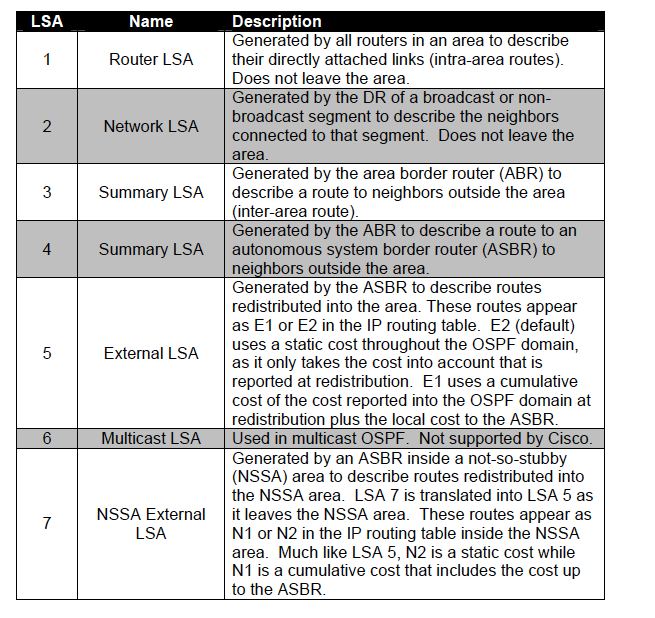
		<title>OSPF LSA types</title>
		<link rel="alternate" type="text/html" href="https://angelcool.net/sphpblog/blog_index.php?entry=entry130111-095639" />
		<content type="text/html" mode="escaped"><![CDATA[Common LSAs:<br /><br />
<img style="border:1px solid #E0E0E0" src="http://angelcool.net/assets/OSPFcommonLSAs.png" />
]]></content>
		<id>https://angelcool.net/sphpblog/blog_index.php?entry=entry130111-095639</id>
		<issued>2013-01-11T00:00:00Z</issued>
		<modified>2013-01-11T00:00:00Z</modified>
	</entry>
	<entry>
		<title>BGP Best Path Selection Process</title>
		<link rel="alternate" type="text/html" href="https://angelcool.net/sphpblog/blog_index.php?entry=entry130107-113243" />
		<content type="text/html" mode="escaped"><![CDATA[Consider only synchronized routes with no AS loops and a valid next hop, and then:<br /><br />1.- Prefer highest weight (local router).<br />2.- Prefer highest local preference (global within AS).<br />3.- Prefer route originated by the local router (next hop: 0.0.0.0).<br />4.- Prefer shortest AS path.<br />5.- Prefer lowest origin code (IGP&lt;EGP&lt;Incomplete).<br />6.- Prefer lowest MED (metric, exchanged between autonomous systems).<br />7.- Prefer eBGP path over iBGP path.<br />8.- Prefer the path through the closest IGP neighbor (IGP cost).<br />9.- Prefer oldest route for eBGP paths.<br />10.- Prefer the path with the lowest BGP neighbor&#039;s Router ID.<br />11.- Prefer the path with the lowest neighbor IP address.]]></content>
		<id>https://angelcool.net/sphpblog/blog_index.php?entry=entry130107-113243</id>
		<issued>2013-01-07T00:00:00Z</issued>
		<modified>2013-01-07T00:00:00Z</modified>
	</entry>
	<entry>
		<title>OSPF Virtual Link Configuration</title>
		<link rel="alternate" type="text/html" href="https://angelcool.net/sphpblog/blog_index.php?entry=entry130104-112906" />
		<content type="text/html" mode="escaped"><![CDATA[
<br>
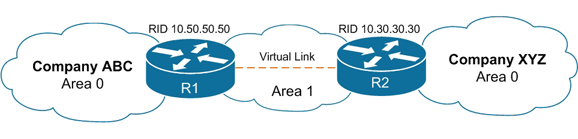
R1(config)#router ospf 20<br>
R1(config-router)#area 1 virtual-link 10.30.30.30<br>
<br><br>
R2(config)#router ospf 20<br>
R2(config-router)#area 1 virtual-link 10.50.50.50


<br><br>
<img style="border:1px solid #E0E0E0" src="http://www.angelcool.net/assets/OSPF-Virtual-Link-1SMALL.gif" />


]]></content>
		<id>https://angelcool.net/sphpblog/blog_index.php?entry=entry130104-112906</id>
		<issued>2013-01-04T00:00:00Z</issued>
		<modified>2013-01-04T00:00:00Z</modified>
	</entry>
	<entry>
		<title>Virtual Routing and Forwarding (VRF)</title>
		<link rel="alternate" type="text/html" href="https://angelcool.net/sphpblog/blog_index.php?entry=entry130101-125114" />
		<content type="text/html" mode="escaped"><![CDATA[In IP-based computer networks, Virtual Routing and Forwarding (VRF) is a technology that allows multiple instances of a routing table to co-exist within the same router at the same time. Because the routing instances are independent, the same or overlapping IP addresses can be used without conflicting with each other.<br />]]></content>
		<id>https://angelcool.net/sphpblog/blog_index.php?entry=entry130101-125114</id>
		<issued>2013-01-01T00:00:00Z</issued>
		<modified>2013-01-01T00:00:00Z</modified>
	</entry>
	<entry>
		<title>Site to Site VPN </title>
		<link rel="alternate" type="text/html" href="https://angelcool.net/sphpblog/blog_index.php?entry=entry121224-022649" />
		<content type="text/html" mode="escaped"><![CDATA[<iframe width="560" height="315" src="http://www.youtube.com/embed/C_B9k0l6kEs?wmode=transparent" frameborder="0" allowfullscreen></iframe><br /><br />Credits to Keith!]]></content>
		<id>https://angelcool.net/sphpblog/blog_index.php?entry=entry121224-022649</id>
		<issued>2012-12-24T00:00:00Z</issued>
		<modified>2012-12-24T00:00:00Z</modified>
	</entry>
</feed>